Note
This page is a reference documentation. It only explains the class signature, and not how to use it. Please refer to the user guide for the big picture.
nidl.volume.transforms.preprocessing.ZNormalization
- class nidl.volume.transforms.preprocessing.ZNormalization(masking_fn=None, eps=1e-08, **kwargs)[source]
Bases:
VolumeTransformNormalize a 3d volume by removing the mean and scaling to unit variance.
Applies the following normalization to each channel separately:
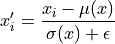
where
 is the original voxel intensity,
  is the data mean,
  is the data std, and
 is a small constant added for numerical stability.
It can handle a
numpy.ndarrayortorch.Tensoras input and it returns a consistent output (same type and shape). Input shape must be or
or  (spatial dimensions).
- Parameters:
- masking_fn: Callable or None, default=None
If Callable, a masking function to be applied on the input data for each channel separately. It should return a boolean mask used to compute the data statistics (mean and std). If None, the whole volume is taken to compute the statistics.
- eps: float, default=1e-8
Small float added to the standard deviation to avoid numerical errors.
- kwargs: dict
Keyword arguments given to
nidl.transforms.Transform.
Notes
If the input volume has constant values, the output will have almost constant non-deterministic values.
Examples using nidl.volume.transforms.preprocessing.ZNormalization
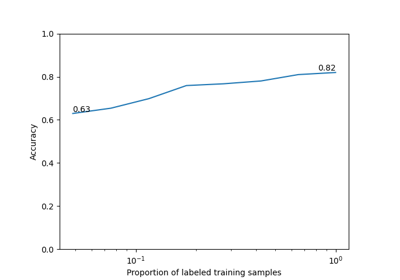
Self-Supervised Learning with I-JEPA on MedMNIST3D